
Pressing start on your dishwasher only to be met with dead silence, dark lights, or unlit buttons is frustrating. When the control panel stops responding, it halts your entire kitchen routine. Fortunately, a completely frozen or unresponsive interface does not always mean you need a brand-new appliance.
Most control panel glitches stem from simple user interface locks, temporary micro-controller freezes, or minor door latch disengagements. By following a systematic troubleshooting process, you can isolate the glitch and restore your unit to working order.
Safety Note: Before inspecting internal wiring, removing the front panel, or touching electrical components, always turn off power to the unit at your home's main circuit breaker or unplug the appliance from the wall outlet.
1. Clear the Control Lock Feature
Before taking anything apart, verify whether the control lock (often called Child Lock) was accidentally activated. This safety feature disables all touchpad buttons to prevent accidental cycle starts or setting changes while the machine is running or idle.
When the control lock is active, pressing buttons will produce no reaction, or a lock icon indicator light will blink. Homeowners frequently bump this button while wiping down the front console after dinner.
How to Unlock the Control Panel
- Locate the Lock Button: Look for a button labeled "Control Lock," "Lock," or one displaying a padlock symbol. On many models, this function is shared with the "Option," "Delay," or "Steam" key.
- Press and Hold: Press and hold the designated lock button firmly for 3 to 5 continuous seconds.
- Listen for the Beep: You should hear an audible chime or see the lock icon light turn off, signaling that the interface is responsive again.
- Test the Console: Select a standard rinse or normal cycle to confirm the buttons now register your input.
If the lock light remains stuck on despite holding the button, proceed to power reset the appliance to clear the board memory.
2. Perform a Hard Power Reset
Modern appliances rely on solid-state circuit boards that act like mini-computers. Voltage spikes, brief power outages, or rapid button pressing can cause the electronic control module to freeze mid-command. A hard power reset drains residual energy and clears temporary memory errors.
Resetting the control board is one of the easiest DIY troubleshooting steps, requiring zero tools or technical experience.
Steps for a Hard Power Reset
- Disconnect Power: Go to your home circuit breaker box and flip the breaker dedicated to the kitchen dishwasher to the OFF position. Alternatively, unplug the unit from under the sink.
- Wait 10 to 15 Minutes: Leave the power completely disconnected for at least 10 full minutes. This allows the internal capacitors on the circuit board to discharge fully.
- Clear Residual Energy: While power is off, press and hold the Power or Start button on the console for 5 seconds to drain any remaining stored power.
- Restore Power: Flip the breaker back to ON or plug the unit back into the outlet.
- Run a Test Cycle: Wait two minutes for the internal system to boot up, then select a cycle to test functionality.
If performing a hard power reset fails to revive the interface, the problem may lie with the door switch safety circuit. In some cases, power issues may also trigger electrical tripping; if your home experiences broader electrical cutoffs, review guidance on why your dishwasher is tripping the breaker.
3. Inspect and Reset the Door Latch Switch
Your machine features an internal door latch assembly equipped with tiny microswitches. These safety switches signal the main control board that the door is tightly sealed, allowing water circulation to begin safely.
If the latch mechanism is misaligned, worn out, or failing to activate the microswitches, the control panel may freeze, refuse commands, or blink repeatedly without starting. The system assumes the door is wide open.
How to Check the Door Switch
- Turn Off Power: Ensure the breaker is flipped OFF before touching internal door components.
- Examine the Latch Assembly: Open the door and inspect the top latch strike and catch. Look for bent metal hooks, broken plastic tabs, or trapped food debris preventing full closure.
- Access the Microswitches: Remove the screws along the inner door perimeter to separate the outer cover and expose the latch housing.
- Check Switch Contacts: Visually inspect the microswitches connected to the latch assembly for loose wiring terminals or scorch marks.
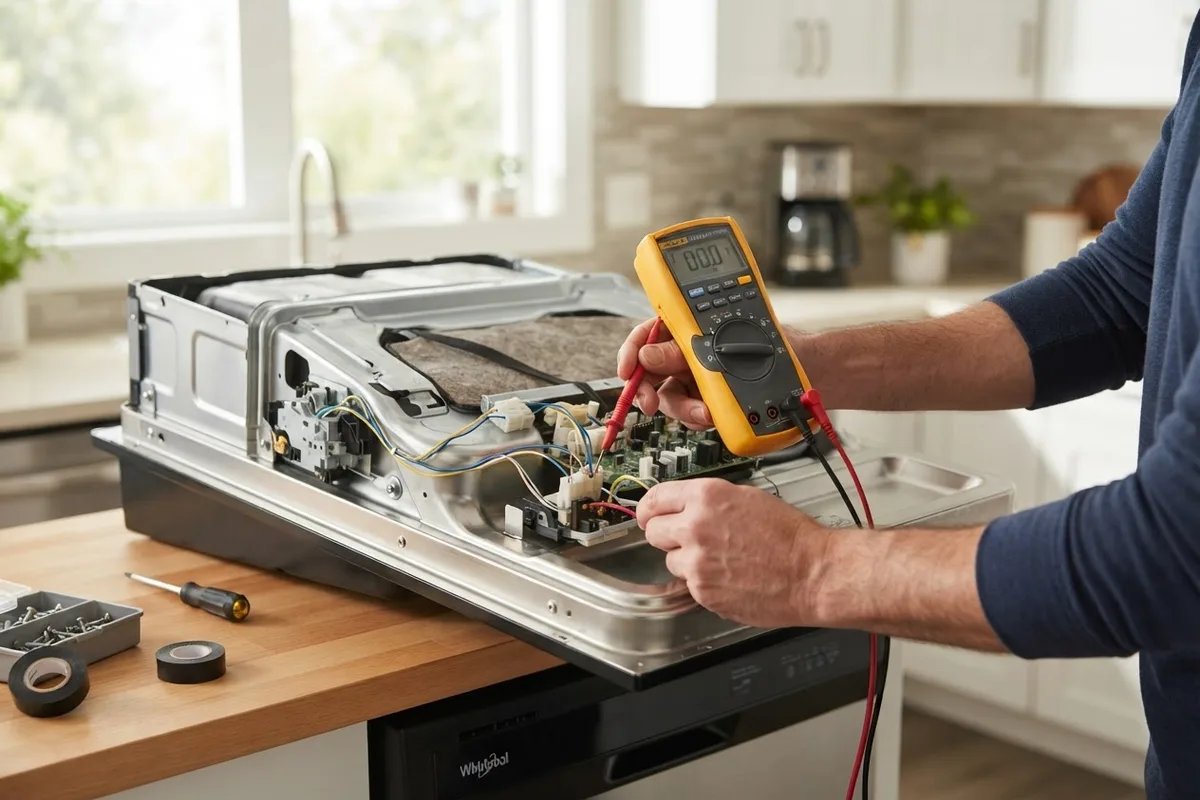
- Test with a Multimeter: Disconnect the wire leads and use a multimeter set to continuity mode. Activating the switch button manually should change the meter reading from infinite resistance (open) to zero resistance (closed).
If a switch fails continuity or the door struggles to snap shut securely, replacing the door latch assembly will typically restore full panel control. If you notice structural issues with the front housing, explore remedies for dishwasher door latching problems.
4. Check for Unresponsive Touchpad Buttons
Over time, moisture, steam, and everyday wear can damage the touch-sensitive membranes or individual tact switches on the console. If specific buttons like Start or Cycle Select do not work while others light up, the touchpad assembly itself is likely damaged.
A faulty touchpad ribbon cable can also disconnect from the main control module, cutting off communication between your fingers and the brain of the appliance.
Troubleshooting Touchpad and Ribbon Connections
- Shut Off Electrical Power: Never open the control panel with active current flowing to the unit.
- Dismantle Inner Door Housing: Remove the upper screws holding the inner door panel to expose the main console assembly at the top.
- Inspect the Ribbon Cable: Locate the flat, flexible ribbon cable connecting the touchpad membrane to the electronic control board.
- Check for Corrosion: Carefully unclip the ribbon connector from the board. Inspect the metal contact points for green/white oxidation, moisture, or black burn marks.
- Re-seat the Connector: Wipe the ribbon contact edge gently with an pencil eraser or dry microfiber cloth to remove mild oxidation, then firmly re-seat it into its board socket.
If cleaning and reconnecting the ribbon cable does not revive responsiveness, or if individual keys remain completely unclickable, the touchpad panel assembly will need replacement.
5. Test the Thermal Fuse and Main Control Board
If the entire panel is completely dead—showing zero LED lights, display digits, or audible tones—the primary electrical feed to the board may be interrupted. Most modern units incorporate an internal thermal fuse mounted directly onto the control board housing.
If the internal temperature of the door console gets too high (often due to loose wiring or heating element overload), the thermal fuse blows to protect the home from electrical hazards. When this fuse opens, power to the entire panel cuts off completely.
Diagnosing the Control Board and Fuse
- Disconnect Power: Verify the circuit breaker is turned OFF before proceeding.
- Locate the Thermal Fuse: Unbolt the console housing to locate the small, two-wire thermal fuse attached to the main board casing.
- Perform a Continuity Test: Pull the two wire leads off the fuse. Touch your multimeter probes to the fuse contacts. A functional fuse reads near 0 Ohms; a blown fuse shows open circuit (1 or OL).
- Inspect the Main Board: Examine the circuit board for visible damage, such as blackened components, popped capacitors, or a strong burnt electronic smell.
Replacing a blown thermal fuse is an inexpensive repair. However, if the main board itself displays scorched trace lines or melted relays, the entire electronic board must be swapped.
Control Panel Diagnostic Summary
Use this quick reference table to match your console symptoms to the most probable cause and practical fix:
| Control Panel Symptom | Probable Cause | Recommended Action |
|---|---|---|
| Lock light illuminated, no key response | Control Lock safety engaged | Hold Lock key for 3-5 seconds to clear |
| Panel frozen, buttons unlit or unselected | Micro-controller logic glitch | Perform a 10-minute hard breaker reset |
| Start button blinks, cycle won't begin | Faulty door latch microswitch | Test latch continuity; replace switch if open |
| Select keys work, Start key fails | Failed touchpad ribbon connector | Clean ribbon contacts or swap touchpad unit |
| Completely dead console, zero lights | Blown thermal fuse or main board | Test fuse continuity; replace fuse or board |
When to Call a Pro
While clearing a control lock or performing a hard power reset is well within the reach of most DIY-minded homeowners, diagnosing advanced circuit board issues involves working with high-voltage components.
If you have verified that power reaches the appliance, but testing components yields inconsistent multimeter results—or if you feel uncomfortable removing internal door panels—it is best to hand the job over to a qualified technician. Attempting complex wiring repairs without proper electrical safety equipment can risk further damage to delicate onboard microprocessors.
When you need expert help diagnosing persistent electronic issues, True Appliance Repair can match you with a local appliance pro to diagnose and repair your unit quickly.
FAQ
Why are all the lights blinking on my dishwasher panel?
Blinking lights across the entire control console typically indicate a system error code or a stuck button condition. First, try turning off the power at the breaker for 10 minutes to clear the error. If the flashing resumes when power returns, a stuck touchpad button, blown heater element, or door latch sensor fault is likely signaling a system shutdown.
How much does it cost to replace a dishwasher control board?
Replacing an electronic control board typically ranges between $150 and $350 for parts and labor, though exact costs vary by area, brand, and appliance model. Because replacement control boards can be expensive, it is always wise to rule out minor issues like a tripped breaker, locked console, or blown thermal fuse before purchasing a replacement board.
Can steam or moisture damage the control panel?
Yes. If the upper door seal degrades or if hot steam escapes past the console gasket during high-temp dry cycles, moisture can enter the touchpad housing. Over time, steam causes copper traces on ribbon cables to corrode, resulting in dead buttons or shorted circuit board tracks.
How do I know if the touchpad or control board is bad?
If some keys light up and function while specific high-use buttons (like Start or Options) refuse to respond, the touchpad module is usually at fault. If the entire display is dark, ignores all inputs, and has a verified functional thermal fuse and incoming line voltage, the main control board is usually the failing component. If your machine fails to turn on entirely despite checking power connections, review our guide on fixing a dishwasher that won't turn on.