
Few kitchen annoyances disrupt a quiet evening—or a busy holiday baking session—faster than an oven beeping randomly for no clear reason. Whether your range chirps at 2 a.m. while idle or sounds an alarm mid-bake, the noise usually points to a power glitch, trapped steam behind the touchpad, a misaligned door latch, or a temperature sensor fault. Walk through these six safe DIY checks to pinpoint the cause and silence phantom oven beeps.
1. Reset the Oven Power at the Breaker
Electronic oven controls act like small computers, and even a brief brownout or power flicker can freeze the processor into a beeping loop. A full power cycle clears temporary logic errors and often stops phantom chimes right away.
- Turn all stovetop burners and oven controls to the Off position.
- Locate the dedicated double-pole range breaker in your main electrical panel.
- Flip the breaker firmly to Off and wait 3 to 5 minutes so the control board fully discharges.
- Switch the breaker back On, reset the clock, and listen for any repeat beeps over the next hour.
Safety first: never remove the electrical panel cover or touch interior wiring. Only toggle the labeled breaker switch. If the breaker feels warm, smells scorched, or trips back off immediately, leave it off and call an electrician or appliance repair pro.
2. Check Timers, Delay Start, and Demo Modes
Before assuming a hardware failure, rule out an overlooked setting. Wiping down the stove console after cooking can easily trigger a reminder chime, delay-bake timer, or control lock that beeps periodically.
- Press and hold the Clear or Cancel/Off button for 3 to 5 seconds to cancel active baking programs.
- Look closely at the digital display for small icons such as a padlock, bell, clock, "Delay," "Sab" (Sabbath mode), or "Demo."
- If a padlock icon appears, press and hold the Control Lock or Lock button for 3 seconds until the chime confirms it is unlocked.
- Check the kitchen timer separately—on many ranges, pressing Cancel turns off the oven heat while leaving the minute timer counting down.
Some modern ranges also chime to remind you that preheating finished or a clean cycle was interrupted. Clearing the active mode silences these scheduled alerts immediately.
3. Dry Moisture and Grease Off the Touchpad
Steam rising from boiling pots on rear burners—or household cleaner sprayed directly onto the console—can slip behind the thin keypad overlay. Once moisture bridges the tiny contacts inside the membrane switch, the board registers ghost button presses and beeps at random.
- Switch off the oven breaker at the electrical panel before cleaning around keypad seams. If you need to slide a gas range forward to unplug it, shut off the manual gas valve first.
- Blot the control panel gently with a clean, dry microfiber cloth.
- Remove sticky grease using a cloth lightly dampened with warm water and one drop of mild dish soap—never spray liquid directly onto the panel.
- Aim a cool-setting hair dryer or small tabletop fan across the console for 15 to 20 minutes to evaporate trapped steam.
Wait until the panel is completely dry before restoring power. If drying stops the beeps, angle pot lids away from the back console during future meals.
4. Inspect for Stuck Keys and Error Codes
Watch the display closely the next time your oven chimes. Many ranges flash a brief diagnostic code—such as F1, F2, F3, F7, or E1—right alongside the tone, giving you a clear clue about which circuit is reacting.
- Write down the exact letter and number code before clearing the screen.
- Turn off power at the breaker so you can inspect the console safely.
- Gently press every button on the keypad and feel for one that sits sunken, feels mushy, or fails to spring back cleanly.
- Use a dry cotton swab to lift crumbs from the trim edge around the buttons, then restore power and check if the code returns.
Codes like F1 or F7 commonly point to a stuck keypad or control board fault, while F3 or F4 generally indicate a temperature sensor circuit problem. If your range also has erratic cooktop heat, review our guide on why a stove burner turns on and off to spot related control issues.
5. Check the Oven Door Latch and Seal
Modern ranges monitor the door position and self-clean lock switch continuously. If the door hangs slightly ajar or the latch mechanism sits out of alignment, the control board can beep repeatedly to warn that the door is not properly closed.
- Let the oven cool completely and shut off power at the breaker before inspecting the latch area.
- Check that heavy roasting racks, foil liners, or oversized pans are not keeping the door from closing flush.
- Wipe grease and baked-on crumbs from the perimeter frame and fiberglass door gasket with a damp cloth, taking care not to tug or tear the seal.
- Inspect the small metal latch hook near the top center of the cavity—if it is jammed in the locked position after a self-clean cycle, do not force it with pliers.
If the beeps happen alongside nonstop airflow after baking, read why an oven fan stays on to rule out a lingering heat-switch issue.
6. Test for Overheating and Sensor Issues
When an oven temperature sensor drifts out of range or blocked vents trap excess heat near the electronics, the control board may trigger an overheat alarm even at normal baking temperatures.
- Verify that the oven's exhaust vents—usually located under a rear burner, along the backguard, or above the door handle—are completely clear of foil, towels, or cookware.
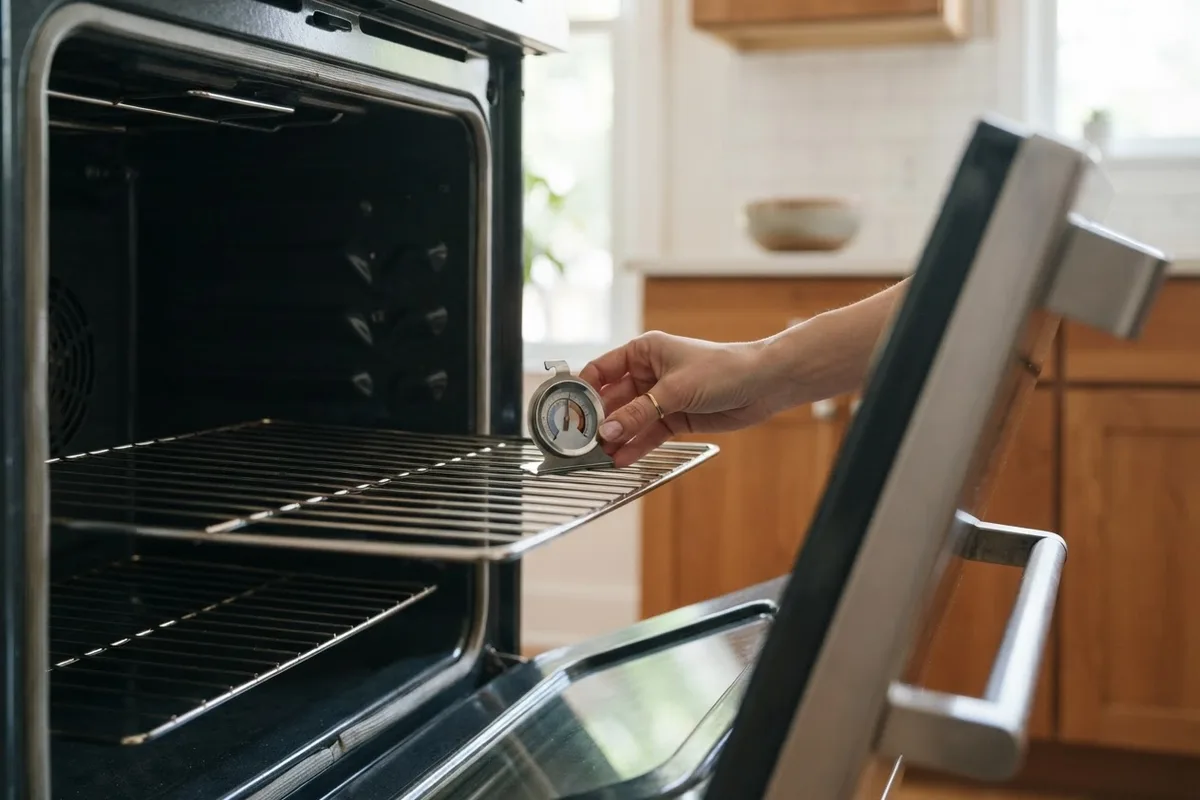
- Place an inexpensive hanging oven thermometer on the center rack, preheat to 350°F, and compare the actual reading after 20 minutes. Swings of 40°F or more suggest a failing sensor or stuck relay.
- Turn off the oven, let it cool completely, and flip the breaker off before inspecting the cavity.
- Visually check the thin metal temperature probe mounted in the upper back corner for loose mounting screws, heavy residue, or physical damage without pulling on its wiring.
Keeping vents unobstructed protects the sensitive electronics behind the console from premature heat stress.
Quick Reference: Common Oven Beep Causes
Use this quick chart to match what you hear and see with the safest next step:
| What You Notice | Most Likely Cause | Safe First Step | DIY or Pro? |
|---|---|---|---|
| Random beeps after boiling pots | Steam inside keypad membrane | Cut breaker power and air-dry console | DIY |
| Random chirps after a storm | Scrambled control board memory | Reset range breaker for 3–5 minutes | DIY |
| Repeating beep with F1 or F7 code | Stuck key or failing touchpad | Clean trim bezel; inspect keypad | Pro |
| Beeping with F2 or extreme heat | Overheating or stuck bake relay | Shut off breaker immediately | Pro |
| Beeping with F3 or F4 code | Faulty temperature sensor circuit | Check vents and sensor visually | Pro |
| Steady chime while oven is idle | Active timer or control lock | Hold Cancel/Off or Lock for 3 seconds | DIY |
When to Call a Pro
Basic resets, drying out trapped steam, and clearing blocked vents solve many phantom beep issues safely at home. Stop and schedule professional service, however, if an F-code returns right after a breaker reset, if the oven heats while turned off, if you smell burning plastic or gas, or if the breaker trips repeatedly. Leave internal control board diagnostics, gas valve checks, and live wiring tests to a trained technician.
Across the US, replacing an oven temperature sensor typically runs about $120 to $250, while replacing a touchpad overlay or main electronic control board generally ranges from $250 to $550—though actual costs vary by area, brand, and model. If the random beeping keeps returning after these checks, True Appliance Repair can match you with a local pro for oven and stove repair so you can get back to quiet, dependable cooking.
FAQ
Why does my oven beep in the middle of the night?
Overnight beeping is often caused by minor utility power flickers, a worn keypad membrane registering phantom touches as kitchen temperatures cool, or trapped moisture inside the console. Try a 5-minute breaker reset first, and watch the display closely for any brief error code the next morning.
Can steam from cooking on the stovetop make my oven beep?
Yes. Steam from uncovered pots on rear burners frequently drifts into the seams around the oven control panel, causing temporary shorts inside the touch keypad. Turning off the breaker and drying the console thoroughly with a fan or cool-setting hair dryer often stops the noise.
Is it safe to keep using an oven that beeps randomly?
If the oven chirps once after a brief power outage and maintains accurate baking temperatures after a reset, it is generally fine to monitor. However, if the beeping comes with an overheating code, burnt smells, erratic temperatures, or heating elements that stay on unexpectedly, turn off the breaker and stop using the range until a technician inspects it.
How do I silence an oven alarm that will not stop?
Start by pressing and holding the Cancel/Off button for 3 to 5 seconds, then check whether a separate kitchen timer is still active. If the alarm keeps sounding with no timer set, switch off the oven's dedicated circuit breaker to silence it safely and prevent potential overheating until you can troubleshoot further or call a technician.