
Running an oven self-clean cycle is one of the easiest ways to prep your kitchen for heavy baking, but it quickly turns frustrating when the cycle refuses to start. High-heat cleaning cycles rely on precise safety interlocking mechanisms, meaning a single sticky latch or faulty temperature sensor will cancel the entire process. Before you give up and scrub by hand, follow this step-by-step troubleshooting guide to get your oven working properly again.
Inspect the Oven Door Latch Mechanism
Self-cleaning cycles heat the oven cavity above 800 degrees Fahrenheit, so modern ranges require a motorized or mechanical door lock to engage before heating begins. If the control board does not sense that the door is firmly locked, the self-clean cycle will instantly abort or display an error code.
- Shut off power to the unit at your home circuit breaker panel before inspecting mechanical parts.
- Open the oven door and examine the latch hook at the top center or upper frame of the door opening.
- Look for bent metal brackets, food residue, or hardened grease that prevents the latch from catching.
- Clean away sticky residue with a warm microfiber cloth dipped in mild dish soap and water.
- Gently push the manual door switch plunger by hand to ensure it moves smoothly without sticking.
If the motor assembly behind the frame has worn out or stripped its internal gears, the switch cannot signal the control board to start heating.
Clear the Control Lock and Child Lockout
Many modern digital ranges feature a control lockout or child safety lock that disables heavy heat functions, including self-cleaning. If someone bumped the keypad or activated lockout during routine kitchen cleaning, the self-clean button will beep but fail to respond.
- Check your oven display panel for icons like a padlock, "LOC", or "CL".
- Locate the designated unlock button—typically labeled Control Lock, Clear/Off, or Cancel.
- Press and hold this button firmly for three to five full seconds until you hear a long confirmation beep and the padlock symbol disappears.
- If your touch control continues to ignore presses, review our guide on why your oven touchpad is not responding for touchpad calibration and ribbon cable troubleshooting.
Once the lock clears, select your desired clean cycle duration (usually two to four hours) and press Start.
Reset the Main Control Board Power
Modern ranges contain computerized control boards that can freeze or experience logic glitches after minor power surges or electrical fluctuations. A simple hard reset clears residual electrical faults from memory and restores proper relay operation.
- Switch off the dedicated 240-volt double-pole breaker for an electric range, or the 120-volt breaker for a gas model.
- If your appliance plugs into an accessible outlet, unplug the power cord entirely.
- Leave power disconnected for at least 10 full minutes to allow the board capacitors to drain completely.
- Restore power at the electrical panel.
- Set the current time on the digital clock (many ovens will not start specialized cycles until the clock is configured).
- Attempt to start the self-clean cycle again.
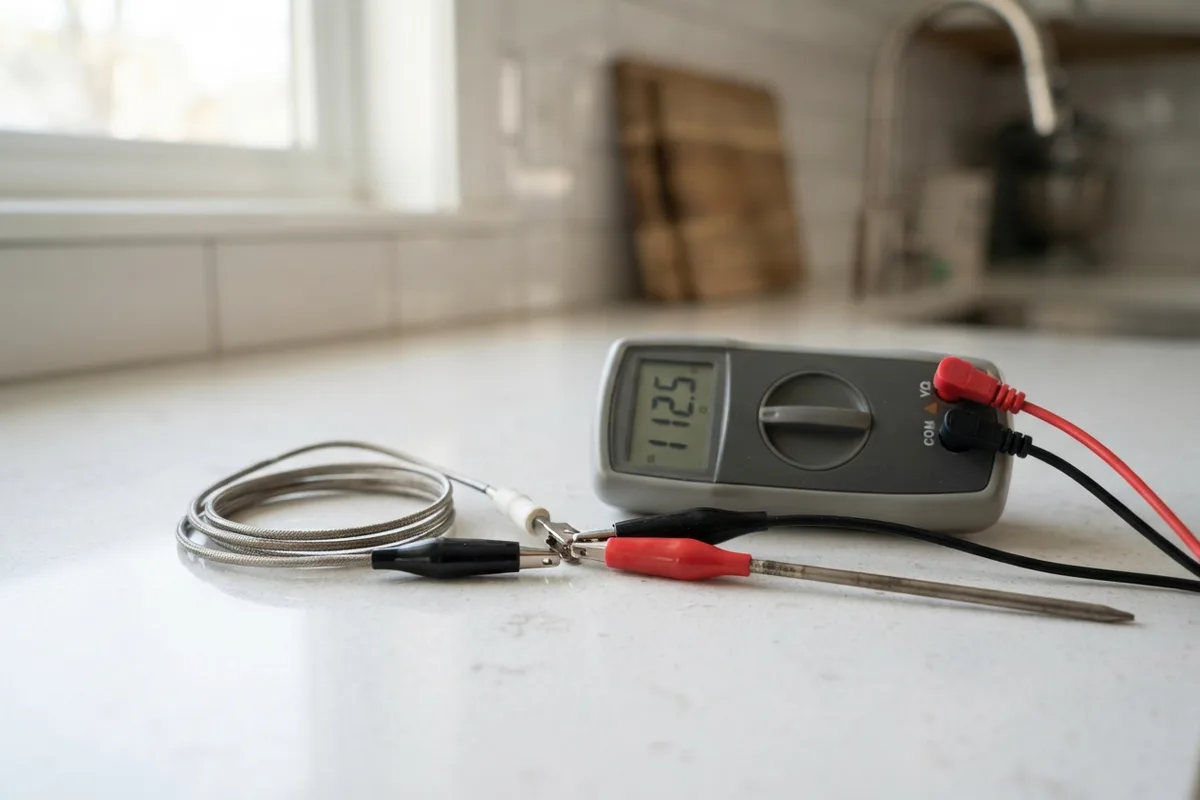
Test the Oven Temperature Sensor Probe
Your oven temperature sensor is a thin metal rod located in the upper rear corner of the oven cavity. It monitors internal heat levels and tells the computer when the oven reaches high self-cleaning temperatures. If the sensor resistance is out of range, the board shuts down the cycle as a fire prevention safety measure.
| Sensor Status | Resistance Reading (at 70°F) | Result on Self-Clean |
|---|---|---|
| Normal / Healthy | ~1,050 to 1,100 Ohms | Cycle locks and heats normally |
| Open Circuit | Infinite Ohms (OL) | Cycle aborts immediately with error code |
| Shorted / Out of Range | Below 900 or above 1,300 Ohms | Oven overheats or refuses to lock |
To test the probe:
- Disconnect power to the appliance at the breaker panel.
- Remove the two mounting screws holding the sensor probe to the back interior wall.
- Gently pull the wire harness through the hole and disconnect the wire clip.
- Set a digital multimeter to the Ohms (Ω) setting and measure across the sensor terminals. At room temperature (approx. 70°F), standard RTD sensors should read around 1,080 ohms. If the reading is open or wildly incorrect, replace the sensor.
Building proactive inspection habits into your routine helps you catch these electrical faults early; read our checklist on how to extend appliance lifespan to keep all your kitchen units running efficiently.
Check for a Blown Thermal Cutoff Fuse
Ovens include a thermal cutoff fuse (or high-limit thermostat) mounted along the rear exterior panel or under the main cooktop. This component serves as an emergency cutoff: if temperatures rise too quickly, the fuse blows to cut power to the heating elements.
- Confirm the oven is completely disconnected from power at the breaker box.
- Pull the range away from the wall to access the back protective metal cover.
- Remove the hex screws holding the rear access panel in place.
- Locate the small thermal switch (usually a round ceramic or plastic disc with two attached wires).
- Detach the wire terminals and test for electrical continuity using your multimeter.
- If the multimeter shows no continuity (infinite resistance), the fuse has blown and must be replaced.
Note: If a thermal fuse blows during a clean cycle, also inspect the rear cooling fan to ensure proper airflow through the cabinet.
When to Call a Pro
While cleaning sticky latches and resetting power breakers are straightforward DIY tasks, internal control board replacements, high-voltage wiring repairs, and gas valve diagnostics carry inherent safety risks. Never attempt to bypass door switches or alter internal wiring harness connections.
If you have tested the door latch and thermal fuses but your appliance still refuses to operate, professional diagnostic tools can pinpoint faulty relays or failing microprocessors. If you need assistance with an electric or gas range, oven and stove repair services can save you hours of guesswork. Local repair costs for latch assemblies or control boards generally range from $150 to $375, though prices vary depending on your geographic area and appliance model. True Appliance Repair can match you with an independent local pro to inspect your range safely.
FAQ
Why does my oven start self-cleaning and then shut off after 15 minutes?
This issue is almost always caused by an overheating condition or a failing thermal cutoff switch. If the upper cooling fan fails to circulate air around the electronic housing, the safety thermostat detects excessive heat and kills power to protect the wiring.
Can I run self-clean if my oven door latch is broken?
No. The self-clean cycle requires positive confirmation from the door latch switch before the heating elements energize. Forcing the door closed or trying to bypass the latch switch is dangerous due to extreme internal temperatures.
How often should I run the self-cleaning cycle on my range?
Most manufacturers recommend running the self-clean cycle once or twice a year for general maintenance, rather than right before major cooking holidays. Running heavy clean cycles back-to-back can strain internal fuses and electronic control boards.
Why is my oven door stuck locked after a failed clean cycle?
If power cuts out during a cycle, the motorized latch remains locked for safety until the oven cools down. Restore breaker power and allow the oven to cool for at least two hours; the motor will usually reset and unlock automatically.