
A dishwasher that suddenly shuts down mid-cycle can turn a quick kitchen cleanup into a stressful ordeal. When your appliance stops before the cycle is complete, you are often left with wet, dirty dishes and a machine full of still water. Fortunately, this common problem is frequently caused by minor issues that you can resolve without professional help.
Before performing any hands-on diagnostic work or repairs on your dishwasher, always unplug the appliance from the wall or shut off the circuit breaker. Additionally, shut off the water supply valve below the sink. For complex electrical panel work or internal wiring issues, stop and call a professional.
Here are seven easy DIY fixes to try if your dishwasher is stopping mid-cycle.
1. Inspect the Door Latch Assembly
The door latch assembly is one of the most common culprits when a dishwasher shuts down prematurely. For safety reasons, dishwashers are designed to halt all operations immediately if the door is not perfectly sealed and latched. Over time, the latch can become misaligned, or the switches inside the assembly can fail due to normal wear and tear.
To inspect the latch, start by opening the dishwasher door and closely examining the latch mechanism at the top. Look for any visible damage, debris, or food buildup that might prevent the door from closing tightly. Clean the area with a warm, damp cloth if necessary. Next, try gently pushing the door closed. You should hear a distinct click, and the door should fit snugly against the cabinet.
If the latch looks physically intact but the cycle still cuts out, the internal door switch may be failing. To test this, you will need to remove the inner door panel to access the switch. Use a multimeter to test the switch for continuity when the latch is engaged. If the multimeter shows no continuity, the switch is defective and needs to be replaced. Replacing a door latch switch is a straightforward DIY task that usually requires only a screwdriver and a few minutes of your time.
2. Reset the Electronic Control Board
Modern dishwashers are essentially small computers, and just like your computer or smartphone, their electronic control boards can occasionally experience software glitches. A sudden power surge, a quick outage, or even a brief interruption in your home's water pressure can confuse the control board, causing the dishwasher to stop mid-cycle.
Practicing 7 home appliance maintenance habits for the New Year includes periodic electronic resets. To reset your dishwasher's control board, find your home's electrical panel and flip the circuit breaker designated for the dishwasher to the "off" position. Leave the power off for at least five to ten minutes. This allows any residual electricity in the control board's capacitors to fully drain, ensuring a complete reset.
While you wait, inspect the dishwasher's exterior control panel for any stuck buttons. Sometimes, a button that is physically jammed or continuously pressed down can interrupt a cycle. Gently press each button on the panel to ensure they all click and spring back properly. After ten minutes, flip the circuit breaker back on and attempt to run a short cycle. If a minor glitch was the cause, your dishwasher should now run smoothly from start to finish.
3. Test the Thermal Fuse for Continuity
The thermal fuse is a critical safety component designed to protect your dishwasher's motor and control board from overheating. If the dishwasher gets too hot during operation, the thermal fuse will "blow," immediately cutting off all electrical power to the appliance. This will cause the dishwasher to stop instantly, often leaving the display completely dead and water sitting at the bottom of the tub.
To access the thermal fuse, ensure the power is completely shut off at the breaker. Remove the dishwasher's inner door panel or lower access kick plate, depending on your model. The thermal fuse is usually a small, cylindrical component with two wires attached to it, mounted near the main control board. Carefully disconnect the wires from the fuse.
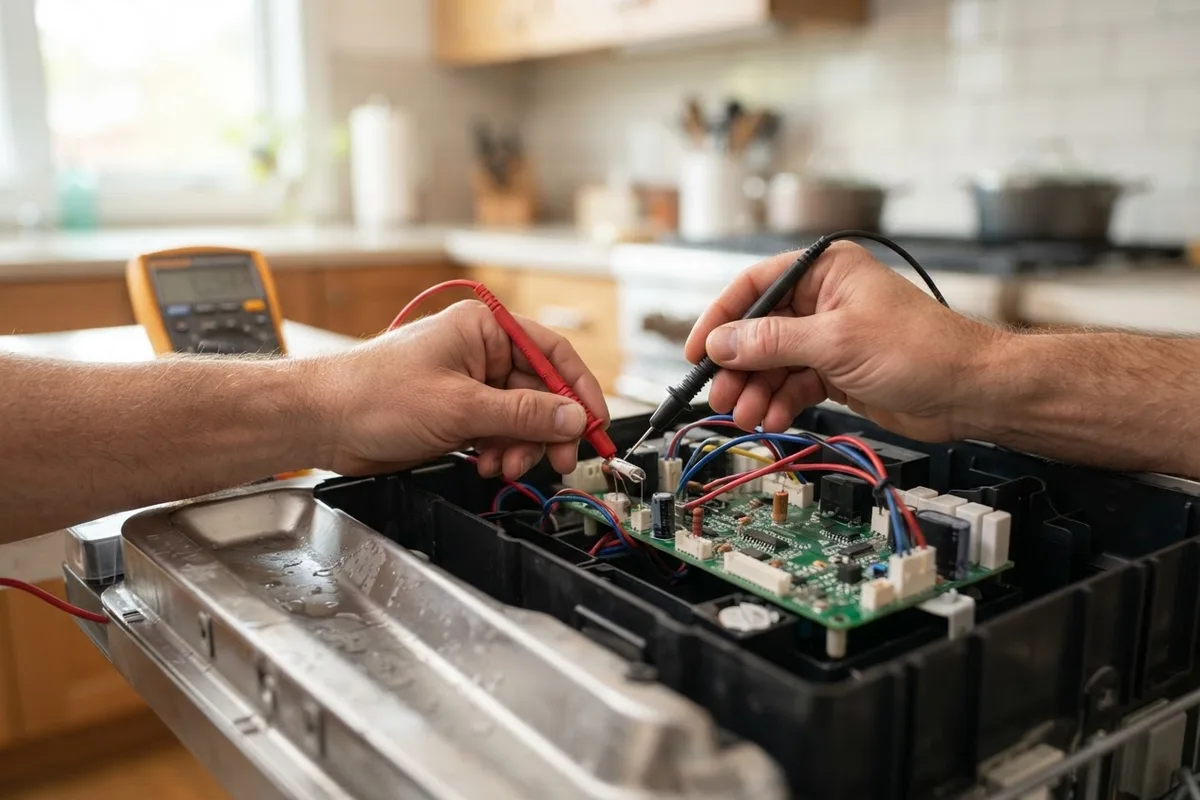 Set your multimeter to the lowest ohms setting or the continuity function. Place the multimeter probes onto the two terminals of the thermal fuse. If the multimeter reads near zero ohms or emits a continuous beep, the fuse has continuity and is functioning correctly. If the multimeter reads "1" or "OL" (Open Loop) and does not beep, the fuse has blown and must be replaced. A blown thermal fuse cannot be reset; it must be swapped with a new one. Additionally, if the fuse was blown, inspect the heating element and wiring, as a blown fuse is often a symptom of another component causing the machine to overheat.
4. Check the Water Inlet Valve
The water inlet valve controls the flow of water into your dishwasher. If the valve fails, becomes clogged, or cannot open fully, the dishwasher will not receive enough water to proceed with the cycle. Many modern dishwashers will pause or stop mid-cycle if they do not detect the correct water level within a specific timeframe, which is a safety feature designed to prevent the heating element from burning out.
To inspect the water inlet valve, look behind the lower access panel at the bottom front of the dishwasher. The valve is usually located on the left or right side where the main water line connects to the appliance. First, check the external water supply to ensure the valve under your sink is fully open and that your home has adequate water pressure.
If the water supply is fine, disconnect the water line from the inlet valve (be sure to have a towel and bucket ready to catch any spills). Look inside the valve's intake port. You should see a small mesh screen designed to trap sediment and rust. If this screen is clogged with mineral deposits or debris, it will restrict water flow. Carefully clean the screen with a soft brush and water. If the screen is clean but the dishwasher still fails to fill and stops mid-cycle, the valve's internal solenoid may have failed. You can test the solenoid for continuity with a multimeter. If it lacks continuity, or if the valve is physically damaged, replace the water inlet valve.
5. Examine the Heating Element and Sensors
Your dishwasher relies on a heating element at the bottom of the tub to raise the water temperature for effective cleaning and drying. If you have previously researched why your dishwasher is not heating water, you know that temperature sensors and heating elements are closely linked to the appliance's cycle progress. If the control board sends a signal to heat the water but the water temperature does not rise within a set amount of time, the dishwasher may stop mid-cycle and display an error code.
To check the heating element, first inspect it visually. Open the dishwasher and look at the thick, circular metal loop at the very bottom of the tub. Look for any visible signs of damage, such as dark spots, cracks, or blistering on the element's surface. If the element looks physically damaged, it needs to be replaced.
If it looks fine, you will need to access the terminals underneath the dishwasher tub to test it. With the power strictly shut off, remove the lower access panel. Locate the two terminals of the heating element protruding through the bottom of the tub. Disconnect the wires and use your multimeter to test the element for continuity. A functional heating element should typically read between 10 and 30 ohms. If the multimeter reads "OL" or infinity, the element is burned out and must be replaced. Additionally, test the element for a short to ground by placing one probe on a terminal and the other on the metal frame of the dishwasher. If there is continuity to ground, the element is shorted and unsafe, requiring immediate replacement.
6. Look for Loose or Damaged Wiring
Dishwashers experience a significant amount of vibration during their wash and spin cycles. Over years of use, this constant movement can cause electrical connections inside the appliance to vibrate loose. Additionally, the wiring harness that runs through the bottom door hinge to the control panel is constantly bending every time you open and close the door. Over time, these wires can become frayed, pinched, or completely broken, leading to intermittent power losses that cause the dishwasher to stop mid-cycle.
With the electricity shut off at the circuit breaker, carefully remove the inner door panel and the lower access kick plate. Visually inspect the wiring harnesses, paying close attention to the area where the wires pass through the door hinge. Look for any wires that appear pinched, frayed, burnt, or disconnected.
Check the wire connectors at the main control board, the door latch, the thermal fuse, and the motor. Ensure every wire is firmly attached to its corresponding terminal. If you find a loose connection, gently push it back into place until it clicks or feels secure. If you discover a frayed or broken wire, it will need to be repaired or replaced. For safety, if a wire harness is extensively damaged or if you are uncomfortable with electrical repairs, this is the time to stop and call a professional.
7. Decode Error Codes on the Display
If your dishwasher is stopping mid-cycle and its control panel is still illuminated, it is likely displaying an error code. These codes are usually a combination of letters and numbers (such as "F8," "E1," or "4E") or a series of blinking lights. Your dishwasher's control board generates these codes when its internal sensors detect a specific problem, such as a water level issue, a temperature failure, or a drainage bottleneck.
When the cycle stops, write down the exact error code shown on the display. If your dishwasher does not have a digital screen, count the number of times the "Clean" or "Start" light flashes in a sequence. Once you have the code or flash pattern, refer to your dishwasher's owner's manual. The manual will contain a troubleshooting index that decodes these signals and points you directly to the component that is causing the interruption.
If you do not have the physical manual, you can almost always find a digital copy online by searching for your dishwasher's brand and exact model number along with the phrase "owner's manual." Understanding the error code can save you hours of diagnostic guesswork, instantly telling you whether the issue is a heating failure, a water fill problem, or a sensor glitch. Once you know what the code means, you can apply the corresponding fix outlined in this guide.
Quick-Reference Troubleshooting Table
Use this quick-reference table to match your dishwasher's symptoms with the most likely causes and DIY fixes.
| Symptom | Probable Cause | Recommended DIY Fix |
|---|---|---|
| Stops immediately after filling | Water inlet valve, door latch switch | Clean inlet screen, check latch continuity |
| Stops after 5-15 minutes | Blown thermal fuse, heating element | Test fuse continuity, inspect heating element |
| Lights flash, cycle abruptly ends | Control board glitch, sensor error | Reset control board, decode error codes |
| Stops mid-cycle, dead display | Blown thermal fuse, loose wiring | Test thermal fuse, inspect door wiring harness |
| Stops during the drain phase | Drain pump clog, sensor error | Check for drainage blockages, clean sensors |
When to Call a Pro
While many of the fixes for a dishwasher stopping mid-cycle are well within the realm of a DIY project, some situations require advanced diagnostic tools and expertise. If you have reset the control board, tested the thermal fuse, inspected the door latch, and checked the water inlet valve, but your dishwasher still refuses to complete a cycle, it is time to consult an expert.
Additionally, if you discover extensive wiring damage, signs of electrical burning near the control board, or if your diagnosis points to a failed main motor or a complex sealed-system issue, you should stop and seek assistance. For comprehensive kitchen care, explore our full appliance repair services. True Appliance Repair can match you with a local appliance pro who can safely diagnose and repair your dishwasher, ensuring your kitchen routine returns to normal quickly and efficiently.
FAQ
Why does my dishwasher stop 5 minutes into a cycle?
If your dishwasher stops within the first few minutes, the issue is often related to water fill or initial door latch security. The water inlet valve may be failing to let enough water in, causing the machine to pause. Alternatively, the door latch switch may be disconnecting due to door movement or vibration. It could also be a tripped thermal fuse if the unit is overheating immediately.
Can a clogged filter cause a dishwasher to stop mid-cycle?
While a clogged filter typically causes drainage issues, it can indirectly stop a cycle. If water cannot drain properly due to a clog, the dishwasher's flood switch or pressure sensor may trigger, shutting down the cycle to prevent a kitchen flood. While this guide focuses on mid-cycle stops, checking and cleaning your filter and drain pump is always a good maintenance step.
Is it worth fixing a dishwasher that stops mid-cycle?
Yes, it is often worth fixing. Many causes, such as a blown thermal fuse, a loose wire, or a dirty water inlet valve, are inexpensive and easy to repair yourself. However, if the main control board or motor has failed, you will need to weigh the cost of parts against the age of the appliance. Repairing a dishwasher that stops mid-cycle can range from $100 to $400 for parts and labor, depending on whether it is a simple fuse replacement or a complete control board swap. Prices vary by area and model.
How do I know if my dishwasher control board is bad?
Signs of a failing control board include a dead or flickering display, unresponsive buttons, random error codes, or the cycle stopping unexpectedly without any other identifiable mechanical issues. If the control board is receiving the correct voltage from your home's power supply but is not sending voltage to components like the motor or heating element, it likely needs replacement.