
Hearing your oven cooling fan whir for a few minutes after dinner is completely normal, but when that fan continues running for hours, something is wrong. An endlessly running fan wastes electricity, wears down the motor, and usually points to a confused sensor or an airflow problem.
Use this practical guide to pinpoint why your oven fan will not turn off and how to safely resolve the issue at home.
Normal Cooling Cycle vs. Faulty Fan
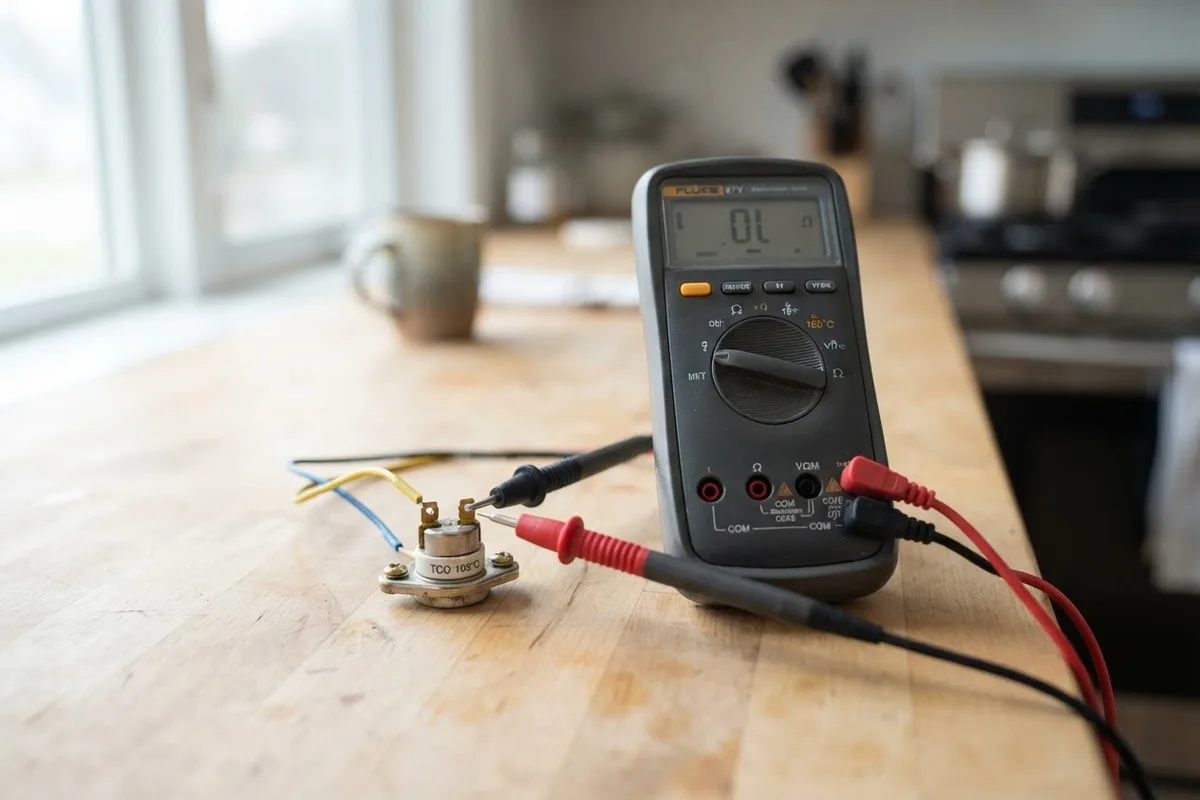
Modern electric and gas ovens use an internal cooling fan—separate from the convection fan—to protect sensitive electronic control boards from extreme heat. This cooling fan often runs for 20 to 60 minutes after you turn the temperature dial to off, especially after high-heat roasting or self-cleaning cycles.
If the fan continues blowing cool air for more than 90 minutes in an ambient room temperature below 75°F, the appliance has slipped past standard operation. Before pulling out tools, determine whether the running fan is the convection fan (inside the oven cavity) or the cooling blower (venting above or below the door). A convection fan should stop immediately when the oven door opens or the bake cycle ends, while a cooling fan operates on a dedicated thermal switch.
| Fan Type | Location | Normal Run Time After Cooking | Shuts Off When Door Opens? |
|---|---|---|---|
| Convection Fan | Inside rear cavity wall | Stops immediately when cycle ends | Yes (on most models) |
| Cooling Fan | Internal housing / above cavity | 20 to 60 minutes after shutoff | No (runs until cavity cools) |
| Exhaust Blower (Downdraft) | Cooktop base / rear vent | Manual switch control | No |
1. Reset the Oven Power at the Breaker
Modern digital ranges rely on microprocessors that occasionally freeze after voltage fluctuations or long baking sessions. A simple power reset clears corrupted memory states that signal the fan relay to stay energized.
- Locate your home electrical service panel.
- Flip the dedicated double-pole breaker for your range or wall oven to the OFF position. If you have a slide-in range with an accessible cord, unplug it directly from the wall outlet.
- Wait a full 10 to 15 minutes to let the internal capacitors discharge completely. You can learn more about general reset procedures in our guide on how to reset home appliances.
- Flip the breaker back to ON and observe the oven.
If the fan remains quiet until your next cooking cycle, a temporary electronic glitch caused the malfunction. If the fan instantly roars back to life while the oven is cold, move to physical component checks.
2. Test and Clean the Oven Temperature Sensor
The oven temperature sensor (a thin metal probe usually located in the upper rear corner of the oven cavity) monitors internal heat and communicates with the control board. If grease splatters coat this probe, or if its internal resistance drifts, the control board assumes the oven is still hot and keeps the fan spinning.
- Ensure the oven is completely cold and disconnected from power at the breaker box.
- Open the oven door, remove the racks, and locate the sensor probe protruding from the back wall.
- Wipe the probe clean with warm water, mild dish soap, and a non-abrasive microfiber cloth to remove baked-on oils.
- To test electrical resistance, remove the two mounting screws holding the probe to the back wall, gently pull the wire harness forward, and disconnect the plastic terminal clip.
- Set a digital multimeter to measure ohms (Ω) at room temperature (around 70°F). A standard RTD sensor should read approximately 1,000 to 1,100 ohms. A reading of zero ohms (short circuit) or infinite resistance (open circuit) means the sensor has failed and requires replacement.
3. Check the Cooling Fan Thermal Switch
The cooling fan thermal switch (sometimes called a fan thermostat or high-limit switch) is a bi-metal disc that closes an electrical circuit when the oven reaches roughly 120°F to 150°F, turning the fan on. When the oven cools below this threshold, the switch opens, cutting power to the fan.
Over years of thermal expansion, these mechanical contacts can weld themselves shut. When this happens, continuous electrical current flows to the fan motor even when the oven is room temperature.
- Disconnect all electrical power to the appliance at your main breaker panel.
- For wall ovens, you must slide the unit partially out of the cabinet cavity; for freestanding ranges, remove the upper rear access panel.
- Locate the small, disc-shaped thermal switch mounted along the upper air duct or near the blower motor.
- Label and detach the two slip-on wire connectors.
- Test continuity across the switch terminals using your multimeter. At room temperature, a functioning cooling fan thermal switch should show no continuity (open circuit). If your meter beeps or displays near zero ohms on a cold switch, the contacts are stuck closed and the part must be replaced.
4. Clear Blocked Ventilation Airways
An oven fan might run continuously because the oven simply cannot shed its heat. If intake vents or exhaust louvers become clogged with household dust, pet hair, or grease residue, internal temperatures remain elevated for hours.
- Inspect the vent trim located beneath the control panel or directly below the oven door.
- Use a vacuum with a soft brush attachment to lift dust and lint from the intake slats.
- Check the exhaust vent—often positioned under one of the rear surface burners on a freestanding range—for grease build-up or dropped foil liners.
- Ensure at least one inch of clearance behind freestanding ranges to maintain natural airflow.
Restoring clean airflow allows the internal cavity to cool at its engineered rate, letting the thermal switch disengage normally. If your oven shows erratic heating patterns alongside fan problems, review our troubleshooting steps for why an oven keeps shutting off.
5. Inspect the Main Control Board Relay
The main electronic control board houses small mechanical relays that open and close electrical lines to your heating elements, lights, and fans. Repeated electrical cycling can cause the internal contacts of the fan relay to melt together in a closed state.
If your temperature sensor and thermal switch both test normal, a stuck relay on the main control board is almost always the root problem.
- Turn off power at the main breaker before opening the control console housing.
- Visually inspect the back of the circuit board for scorch marks, melted solder joints, or swollen capacitors around the fan output traces.
- While individual relays can technically be desoldered and replaced by electronics technicians, the standard appliance repair procedure involves swapping the entire main control board assembly.
When to Call a Pro
Basic troubleshooting like power cycling, cleaning vents, and wiping down temperature sensors is safe and manageable for any homeowner. However, you should stop and call a professional technician if:
- You must remove a built-in wall oven from high cabinetry to access internal wiring.
- You detect the smell of burning plastic or ozone around the main control panel.
- Your range uses gas connections that must be moved or disturbed to reach the rear access panel.
- Testing points to a failed main control board or shorted internal wiring harness.
Professional diagnostic visits for oven fan and electronic repairs typically range from $130 to $320 depending on your region and the specific replacement components needed. When dealing with complex electrical panels or heavy wall installations, True Appliance Repair can match you with an independent, vetted local repair pro to handle the job safely.
FAQ
Is it safe to leave an oven fan running overnight?
While a running cooling fan does not pose an immediate fire hazard, leaving it running continuously for days can overheat the fan motor windings, waste electricity, and lead to premature motor failure. If the fan will not stop after two hours, shut off the appliance breaker until you can inspect the issue.
Why does my oven fan turn on as soon as I flip the breaker?
If the fan starts immediately on a completely cold oven the moment power is restored, either the thermal switch contacts have welded closed, or the cooling fan relay on the main electronic control board is stuck in the closed position.
How long should an oven cooling fan run after baking?
Under typical kitchen conditions (68°F to 74°F), an oven cooling fan runs between 20 and 60 minutes after cooking finishes. If you ran a high-temperature self-clean cycle or baked above 450°F for multiple hours, the fan may run for up to 90 minutes before shutting down.
Can I just unplug the fan motor to stop the noise?
Never disconnect the cooling fan motor to silence the appliance while continuing to bake. The cooling fan prevents extreme heat from melting the oven's digital control board, wire insulation, and front panel switches. Operating the oven without an active cooling fan can cause severe, costly electronic damage.