
Pressing the start button on a packed dishwasher only to get a blank screen or flashing lights brings kitchen cleanup to a frustrating halt. Fortunately, a dishwasher not starting rarely means the motor has failed—most of the time, it comes down to a simple safety lock, power interruption, or door alignment issue. Before you start washing everything by hand, walk through these six practical DIY checks to get your cycle running again.
Safety First: Before inspecting any electrical cords, outlet connections, or internal switches, unplug your dishwasher under the sink or turn off its dedicated circuit breaker at your home's main electrical panel. Never touch exposed wiring or work near standing water with the power connected.
1. Check the Child Lock and Delay Start Settings
Modern dishwashers are packed with touchpad features that are surprisingly easy to trigger by mistake when leaning against the counter or wiping down the door. If the control panel lights up when you press buttons, or flashes a tiny padlock or clock icon, the machine isn't broken—it is just waiting.
- Look for a lock indicator: Check the display or button area for a small padlock symbol, an "L" code, or the words "Control Lock" printed beneath one of the cycle buttons (often the Heated Dry or Rinse Only button).
- Deactivate the child lock: Press and hold the designated lock button for three to five full seconds until the indicator light turns off and you hear a confirmation chime.
- Clear out Delay Start: If a number such as "2H" or "4H" is glowing, or the Delay light is blinking, the dishwasher is counting down to run later. Press the "Cancel/Drain" button once or hold down "Delay Start" until the timer resets to zero, then select your wash cycle and press start again.
2. Inspect the Door Latch and Strike Alignment
By design, a dishwasher will never start filling or running if the internal safety switch cannot verify that the door is tightly sealed. Even if the door clicks shut, a slightly bent strike plate or an overloaded rack can keep the sensor from engaging by a fraction of an inch.
- Check for rack obstructions: Pull out both the upper and lower racks. Look for tall cutting boards, baking sheets, or pot handles sticking out the front or back that prevent the rack from rolling all the way in.
- Inspect the rubber tub gasket: Run your fingers along the black or gray rubber seal framing the dishwasher tub. If the gasket has popped out of its channel or has hardened food debris built up in the corners, wipe it clean with warm soapy water and press it firmly back into the groove. (If you ever notice drips during a run, check out our guide on why your dishwasher is leaking from the door.)
- Check the metal strike plate: Look at the U-shaped metal or plastic catch at the top center of the tub frame. Close the door slowly at eye level to make sure the strike lines up cleanly with the latch slot in the door without scraping.
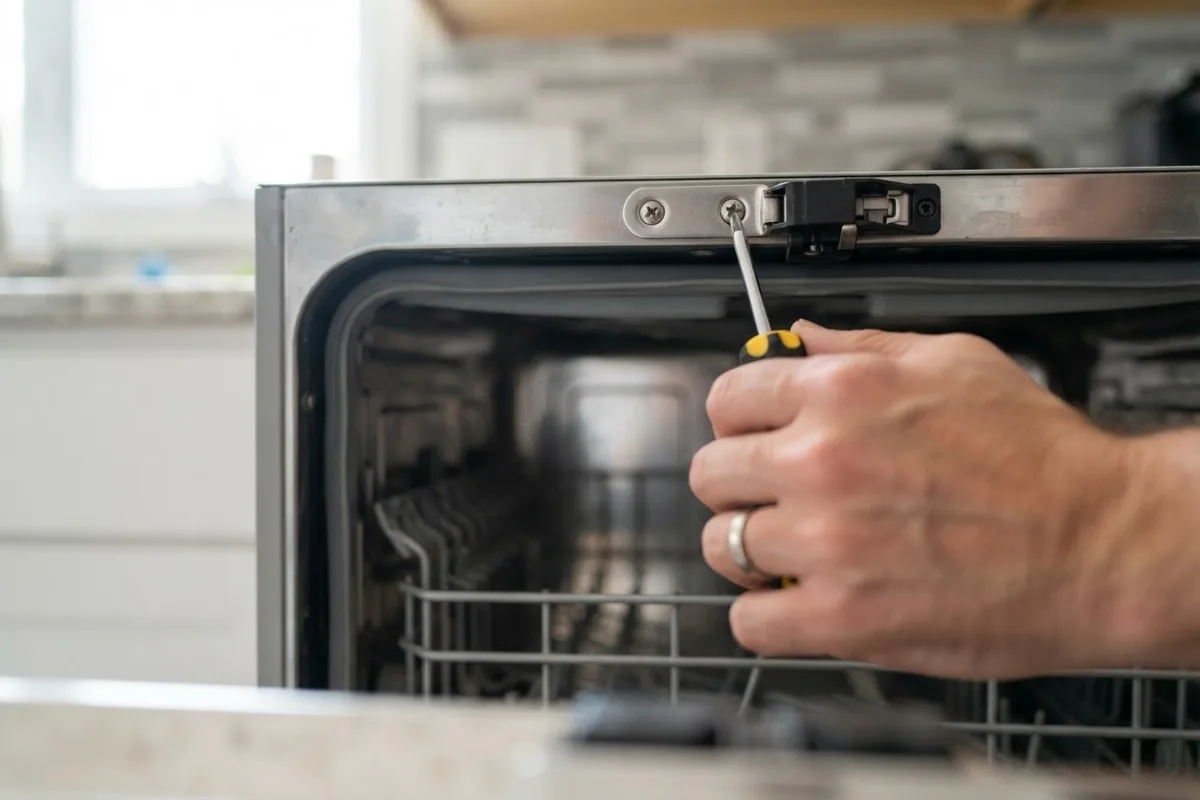
- Tighten loose mounting screws: If the strike plate wiggles when you touch it, tighten its mounting screws with a Phillips screwdriver so it engages the door switch crisply.
3. Perform a Hard Power Reset at the Breaker
If the dishwasher has no lights at all, or if the touchpad buttons are completely frozen and unresponsive, the electronic control board may have experienced a minor power glitch. Performing a hard reset clears the board's memory and resets tripped breakers.
- Check the under-sink power source: Open the cabinet next to your dishwasher (usually under the kitchen sink). If your dishwasher plugs into a three-prong wall outlet, make sure the plug hasn't been bumped loose by trash cans or cleaning supplies.
- Reset any GFCI outlets: Many kitchen circuits are protected by a GFCI outlet either under the sink or above the countertop. Press the "Test" button and then firmly press the "Reset" button until it clicks and stays in.
- Flip the circuit breaker: Go to your home's main electrical panel and find the breaker labeled "Dishwasher" (sometimes shared with "Disposal"). Even if the switch doesn't look tripped, flip it all the way to the OFF position.
- Wait five minutes: Leave the power off for a full five minutes so the capacitors on the dishwasher's main control board can discharge completely.
- Restore power and test: Flip the breaker back to ON. Return to the kitchen, wait thirty seconds for the board to boot up, select a normal cycle, and press start.
4. Free a Stuck Float Switch in the Tub Floor
If the control panel lights up and the countdown timer starts, but the machine sits completely silent without filling with water, the overfill float switch may be stuck in the "full" position. When the dishwasher thinks the tub is already full of water, it blocks the water inlet valve from starting the cycle.
- Locate the float dome: Pull out the bottom dish rack and look at the front corner of the dishwasher floor for a small plastic cylinder or mushroom-shaped dome.
- Test the up-and-down movement: Gently lift the plastic float up about half an inch and let it drop. It should fall back down smoothly with a faint mechanical click from the switch underneath.
- Clean out trapped debris: If the float feels sticky or stays raised, check underneath the plastic skirt for lodged toothpicks, fruit stems, broken glass, or greasy detergent buildup. Wipe around the post with a damp cloth and warm vinegar until it moves freely. While you have the lower rack out, it is also smart to check the wash arms; if dishes have been coming out dirty lately, see our guide on why a dishwasher spray arm is not spinning.
5. Run the Cancel-and-Drain Sequence
Sometimes a dishwasher refuses to start a new wash cycle because the previous cycle was interrupted mid-run—for example, if someone opened the door to add a mug and forgot to press start again before closing it. Until the leftover cycle state is cleared out, pressing a new wash button won't work.
- Press and hold Cancel/Drain: Wake up the control panel and press the "Cancel" or "Cancel/Drain" button (on some models, you hold the Start button for three seconds).
- Listen for the drain pump: Close the door firmly. You should hear the drain pump hum for about 60 to 90 seconds as it clears any residual water from the sump basin.
- Wait for the cycle to end: Do not open the door or press other buttons until the drain pump stops completely and all cycle lights turn off.
- Start a fresh wash: Open the door, select your desired wash cycle, press start, and close the door within four seconds (for top-control models).
6. Test the Thermal Fuse and Door Switch Continuity
If your dishwasher still shows zero signs of life—no lights, no beeps, and no hum—after confirming that the outlet or circuit breaker has power, an internal safety component inside the door has likely blown. The two most common culprits are the thermal fuse and the mechanical door switch.
- Disconnect all power: Turn off the circuit breaker at the main panel and verify the machine is completely dead before picking up a screwdriver.
- Open the inner door panel: Open the dishwasher door and use a Torx or Phillips screwdriver to remove the six to eight screws along the inside perimeter that hold the inner metal door panel to the outer door.
- Inspect the thermal fuse: Near the main control board at the top of the door, look for a small inline fuse clipped to the wire harness. Check for any dark scorch marks, melted plastic, or loose wire connectors.
- Test with a multimeter: If you are comfortable using a digital multimeter set to continuity mode, disconnect the two wire leads from the thermal fuse (and then the door latch switch) and touch a probe to each terminal. A continuous beep means the part is good; silence means the fuse has blown to protect the control board and needs replacement.
- Know when to stop: If the wiring harness looks burnt, or if you aren't comfortable disassembling the door panel, reassemble the screws and leave the diagnostic work to a technician.
Dishwasher Not Starting: Quick Troubleshooting Guide
| What You See / Hear | Most Likely Cause | First DIY Action to Try |
|---|---|---|
| Panel lights work, padlock icon or "L" flashes | Child / Control Lock is turned on | Press and hold the Lock button for 3–5 seconds |
| Lights work, start button blinks when pressed | Door latch isn't fully engaging | Push racks in, clean gasket, align strike plate |
| Panel is completely dark and unresponsive | Tripped breaker, GFCI, or blown thermal fuse | Reset kitchen GFCI outlet and flip breaker off for 5 mins |
| Timer starts counting down, no water enters | Overfill float stuck in up position | Lift and clean under the plastic float dome in tub floor |
| Buttons beep but won't select a new wash cycle | Previous cycle is paused mid-run | Hold Cancel/Drain for 3 seconds and let pump run 90 secs |
| Motor hums briefly then clicks off | Circulation pump or capacitor issue | Turn off power and schedule professional service |
When to Call a Pro
While resetting a tripped breaker, deactivating a child lock, or cleaning a sticky float switch takes just a few minutes and costs nothing, deeper electrical or motor repairs require specialized tools. You should stop DIY troubleshooting and call an experienced technician if:
- The circuit breaker trips immediately every time you turn the dishwasher back on (indicating a short circuit).
- You smell burning plastic or see scorch marks on the control board.
- The dishwasher hums loudly from underneath the tub as if trying to start, then clicks off.
Typical professional repair costs in the US range from $120 to $220 to replace a faulty door latch switch or thermal fuse, and $250 to $450 to replace a main electronic control board or circulation pump motor, though prices vary by area and model. Before investing in a major control board or motor swap on an older machine, review our appliance repair cost guide to weigh the repair cost against the price of a new unit. If you are ready for hands-on help, True Appliance Repair can connect you with an independent local pro for reliable dishwasher repair.
FAQ
Why are the lights on my dishwasher working, but it won't start?
When the control panel lights up normally but pressing start does nothing—or causes the start light to blink repeatedly—the dishwasher almost always thinks the door is still open. Check for a tall plate or pan handle keeping the racks from sliding all the way back, clean around the rubber door gasket, and make sure the door latch clicks firmly into the metal strike plate.
How do I reset a dishwasher that won't start?
First, try a soft reset by pressing and holding the "Cancel/Drain" button for three seconds and letting the drain cycle run for 90 seconds until all lights turn off. If the touchpad is frozen or blank, perform a hard reset by turning off the dishwasher's circuit breaker at your main electrical panel for five full minutes before flipping it back on.
Can a clogged drain prevent a dishwasher from starting?
A slow drain usually causes standing water at the end of a cycle rather than stopping the machine from turning on. However, if standing water from a previous load is holding the safety float switch up in the "full" position, the dishwasher will refuse to open the water inlet valve until the water is drained and the float drops back down.
Why did my dishwasher stop getting power completely?
If the display is completely dark, start by checking the GFCI outlets above your counter and under the sink, as well as the dedicated breaker in your electrical panel. If the outlet has power and the plug is secure, the internal thermal fuse inside the dishwasher door has likely blown to protect the control board from overheating or a power surge.